HA WeatherSense – Scientifically* Accurate Feels-Like Temp, Comfort Levels & Dynamic Icons


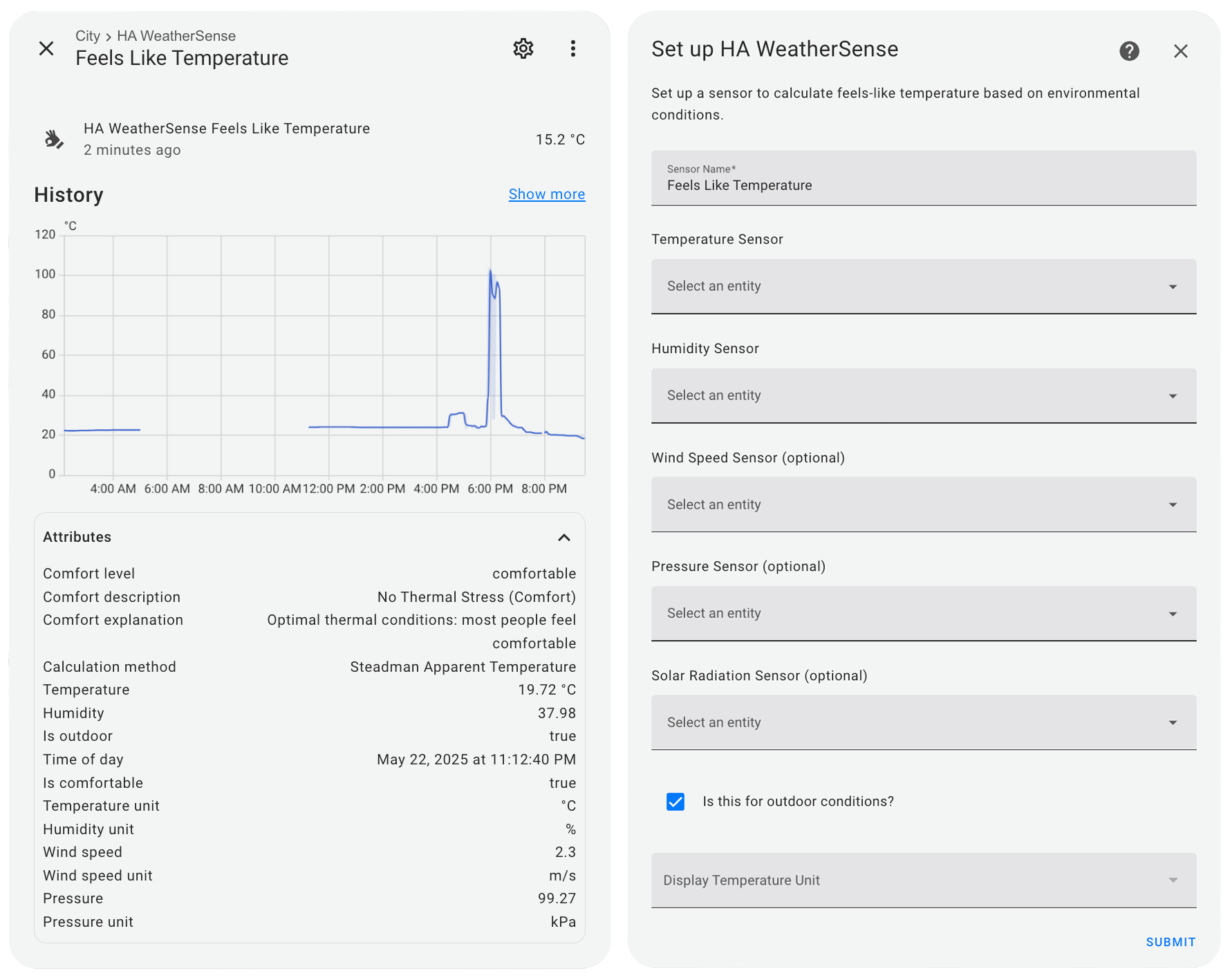

Plug-and-play “feels-like” readings and an instant comfy/not-comfy flag for Home Assistant.
No jargon, just data that works!
- Calculates perceived temperature using scientifically validated models
- Supports both indoor and outdoor environments
- Takes into account:
- Temperature
- Humidity
- Wind speed (for outdoor)
- Atmospheric pressure
- Solar radiation (optional)
- Time of day
- Provides comfort level assessment with detailed explanations
- Includes comfort status indicator (is_comfortable attribute)
- Dynamic icons that change based on comfort level
- Supports different temperature units (°C/°F)
- Automatic unit conversion for any input sensors
- Easy setup through the UI
Check out the WeatherSense Card — a beautiful custom Lovelace card with hybrid glass+material design and dynamic comfort level visualization.
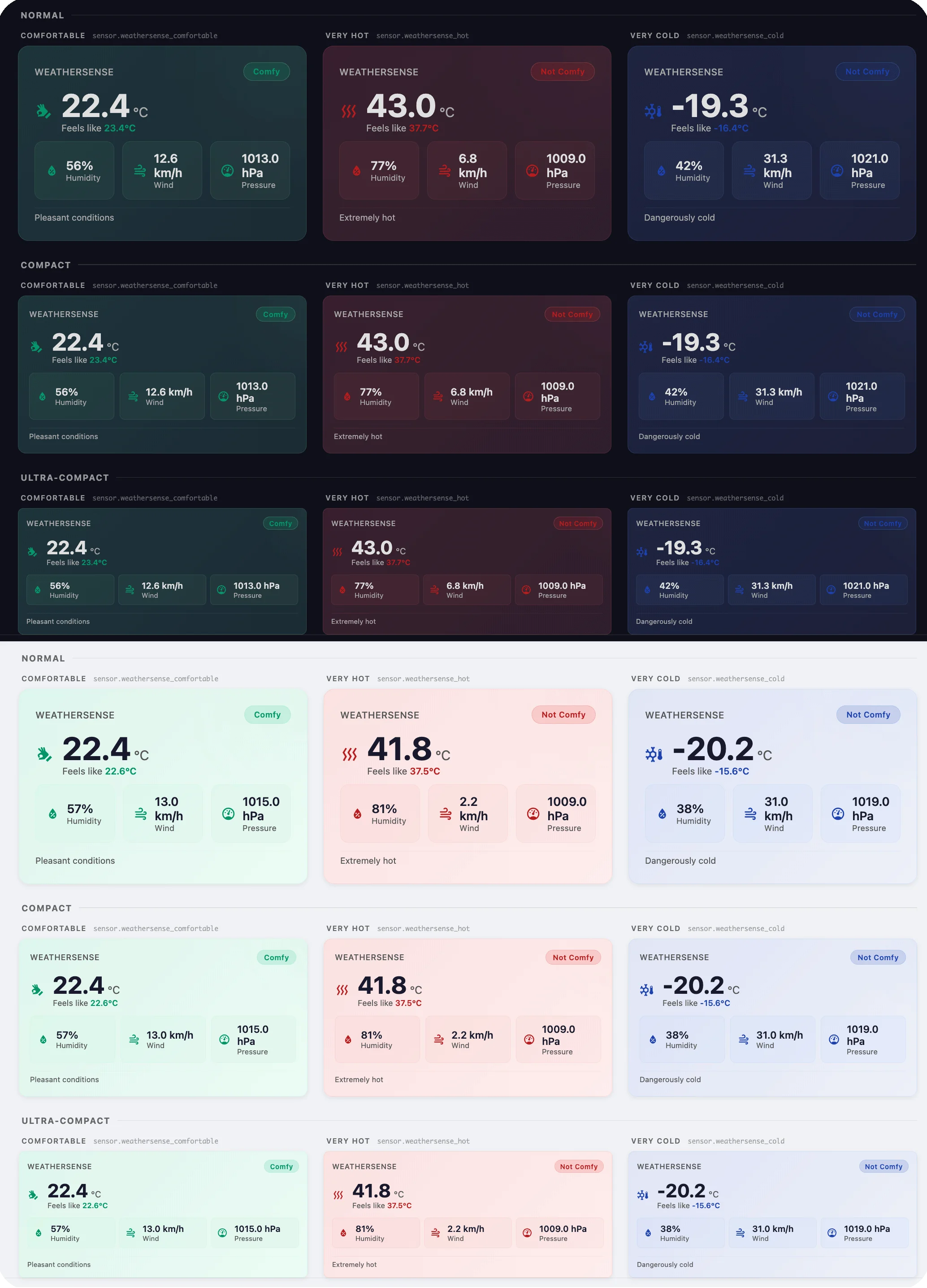
Features:
- Hybrid glass+material design with comfort-level color glow
- Three size modes: normal, compact, ultra-compact
- Extended metrics: temperature, humidity, wind speed, pressure
- Per-metric unit configuration (°C/°F, m/s/km/h/mph/knots, hPa/mmHg/inHg/kPa)
- 11 dynamic color themes based on comfort levels
- Light/dark theme support with smooth animations
- Multi-language support (EN, RU, DE, ES, HI, ZH-CN, CS)
- Install via HACS →

- Make sure HACS is installed in your Home Assistant instance
- Add this repository as a custom repository in HACS:
- Go to HACS → Integrations → ⋮ (menu) → Custom repositories
- Add
https://github.com/smkrv/ha-weathersenseas a repository - Select "Integration" as the category
- Click "Install" on the HA WeatherSense integration
- Restart Home Assistant
- Download the latest release from the GitHub repository
- Extract the
weathersensefolder from thecustom_componentsdirectory - Copy the folder to your Home Assistant's
custom_componentsdirectory - Restart Home Assistant
- Go to Settings → Devices & Services
- Click "Add Integration" and search for "HA WeatherSense"
- Follow the configuration steps:
- Enter a name for your sensor
- Select a temperature sensor
- Select a humidity sensor
- Optionally select wind speed sensor
- Optionally select pressure sensor
- Optionally select solar radiation sensor
- Optionally select wind direction sensor
- Enable/disable wind direction correction (experimental)
- Enable/disable output smoothing (EMA filter) with configurable responsiveness
- Specify if the sensor is for outdoor or indoor use
- Optionally select your preferred temperature display unit
You can add multiple instances of the integration for different locations (e.g., living room, bedroom, outside).
The integration provides the following attributes:
| Attribute | Description |
|---|---|
comfort_level |
Current comfort level code |
comfort_description |
Short description of the comfort level |
comfort_explanation |
Detailed explanation of the comfort level |
calculation_method |
Method used for calculation (Heat Index, Wind Chill, etc.) |
temperature |
Source temperature value (in °C) |
humidity |
Source humidity value (%) |
wind_speed |
Source wind speed value (in m/s) if available |
pressure |
Source pressure value (in kPa) if available |
wind_direction |
Source wind direction value (in °) if available |
wind_direction_correction_applied |
Wind direction correction value (°C) if enabled |
is_outdoor |
Whether this is an outdoor or indoor sensor |
time_of_day |
Current time when calculation was performed |
is_comfortable |
Boolean indicating if current conditions are comfortable |
Note:
comfort_description,comfort_explanationandcalculation_methodare automatically localized based on your Home Assistant language setting.
The sensor's icon changes automatically based on the current comfort level:
| Comfort Level | Icon |
|---|---|
extreme_cold |
mdi:snowflake-alert |
very_cold |
mdi:snowflake-thermometer |
cold |
mdi:thermometer-low |
cool |
mdi:thermometer-minus |
slightly_cool |
mdi:thermometer-minus |
comfortable |
mdi:hand-okay |
slightly_warm |
mdi:thermometer-plus |
warm |
mdi:thermometer-high |
hot |
mdi:thermometer-alert |
very_hot |
mdi:heat-wave |
extreme_hot |
mdi:fire-alert |
HA WeatherSense uses different calculation methods depending on the environment and temperature range:
- Heat Index: Used when temperature is ≥ 27°C and humidity ≥ 40%
- Wind Chill: Used when temperature is ≤ 10°C and wind speed > 1.34 m/s
- Steadman Apparent Temperature: Used for all other conditions
Additional corrections are applied for:
- Time of day (solar radiation effect)
- Atmospheric pressure variations
- Solar radiation (if sensor provided)
For indoor environments, a simplified thermal comfort model is used that primarily considers temperature and humidity interactions.
The integration provides a comfort assessment with the following levels:
| Level | Description | Explanation |
|---|---|---|
extreme_cold |
Extreme Cold Stress | Extreme risk: frostbite possible in less than 5 minutes |
very_cold |
Very Strong Cold Stress | High risk: frostbite possible in 5-10 minutes |
cold |
Strong Cold Stress | Warning: frostbite possible in 10-30 minutes |
cool |
Moderate Cold Stress | Caution: prolonged exposure may cause discomfort |
slightly_cool |
Slight Cold Stress | Slightly cool: light discomfort for sensitive individuals |
comfortable |
No Thermal Stress | Optimal thermal conditions: most people feel comfortable |
slightly_warm |
Slight Heat Stress | Slightly warm: light discomfort for sensitive individuals |
warm |
Moderate Heat Stress | Caution: fatigue possible with prolonged exposure |
hot |
Strong Heat Stress | Extreme caution: heat exhaustion possible |
very_hot |
Very Strong Heat Stress | Danger: heat cramps and exhaustion likely |
extreme_hot |
Extreme Heat Stress | Extreme danger: heat stroke imminent |
automation:
  - alias: "Adjust HVAC based on feels-like temperature"
    trigger:
      - platform: state
        entity_id: sensor.feels_like_temperature
    condition:
      - condition: numeric_state
        entity_id: sensor.feels_like_temperature
        above: 26
    action:
      - service: climate.set_temperature
        target:
          entity_id: climate.living_room
        data:
temperature: 23automation:
- alias: "Notify when outdoor conditions become uncomfortable"
trigger:
- platform: state
entity_id: sensor.outdoor_feels_like
attribute: is_comfortable
from: "true"
to: "false"
action:
- service: notify.mobile_app
data:
title: "Weather Alert"
message: >
Outdoor conditions are now {{ state_attr('sensor.outdoor_feels_like', 'comfort_description') | lower }}.
Feels like {{ states('sensor.outdoor_feels_like') }}°.
{{ state_attr('sensor.outdoor_feels_like', 'comfort_explanation') }}type: entities
entities:
- entity: sensor.feels_like_temperature
secondary_info: last-changed
name: Feels Like Temperature
icon: mdi:thermometer
tap_action:
action: more-info
footer:
type: text
content: "{{ state_attr('sensor.feels_like_temperature', 'comfort_description') }}"The calculations used in HA WeatherSense are based on peer-reviewed scientific models and official standards used by meteorological organizations worldwide. All formula coefficients have been verified against original sources.
The Heat Index formula is the official Rothfusz regression equation from NWS Technical Attachment SR 90-23, which approximates Steadman's (1979) original heat index table. Low-humidity and high-humidity adjustments follow the NWS Weather Prediction Center algorithm. The formula operates in Fahrenheit internally and has been validated through extensive physiological studies measuring human heat stress responses.
The Wind Chill model implements the formula jointly adopted by Environment Canada and the US National Weather Service for the 2001/2002 winter season, developed by Osczevski and Bluestein through the Joint Action Group for Temperature Indices (JAG/TI). The formula was calibrated using wind tunnel tests with 12 human subjects at DCIEM (Defence and Civil Institute of Environmental Medicine) in Toronto, measuring facial heat loss under controlled conditions.
For moderate temperatures, we use Steadman's (1994) Apparent Temperature model: AT = T + 0.33e − 0.70v − 4.00, where vapor pressure e is calculated via the Tetens equation. This formula has been adopted by the Australian Bureau of Meteorology and other international weather services. It accounts for both humidity and wind effects in a unified equation.
The diurnal solar intensity is modeled using a half-sine function, a well-established approach in solar energy literature following Collares-Pereira & Rabl (1979). A simplified fixed 6:00–18:00 window is used instead of actual sunrise/sunset times.
A simplified linear heuristic 0.1 × (101.3 − pressure) is applied for atmospheric pressure deviations from the standard atmosphere (101.325 kPa, 10th CGPM 1954). Note: this is a custom approximation, not a peer-reviewed formula.
The indoor comfort assessment is based on principles from ISO 7730 (Ergonomics of the thermal environment) and ASHRAE Standard 55 (Thermal Environmental Conditions for Human Occupancy), which define internationally recognized thermal comfort standards.
- Rothfusz, L.P. (1990). "The Heat Index 'Equation'." NWS Technical Attachment SR/SSD 90-23. [PDF]
- Steadman, R.G. (1994). "Norms of apparent temperature in Australia." Australian Meteorological Magazine, 43, 1–16. [PDF]
- Osczevski, R. & Bluestein, M. (2005). "The new wind chill equivalent temperature chart." Bulletin of the American Meteorological Society, 86(10), 1453–1458. DOI: 10.1175/BAMS-86-10-1453
- Collares-Pereira, M. & Rabl, A. (1979). "The average distribution of solar radiation — correlations between diffuse and hemispherical and between daily and hourly insolation values." Solar Energy, 22, 155–164. DOI: 10.1016/0038-092X(79)90100-2
- ISO 7730. "Ergonomics of the thermal environment — Analytical determination and interpretation of thermal comfort using calculation of the PMV and PPD indices and local thermal comfort criteria."
- ASHRAE Standard 55. "Thermal Environmental Conditions for Human Occupancy."
- NWS Weather Prediction Center. Heat Index Calculation, Wind Chill Chart.
- Australian Bureau of Meteorology. Thermal Comfort observations.
These models are used daily by meteorological services worldwide to provide accurate "feels like" temperatures to the public, making HA WeatherSense's calculations reliable for both comfort assessment and safety warnings.
Future improvements planned for this integration:
- More advanced indoor comfort models (PMV/PPD)
- Integration with weather forecasts for predictive comfort
- Custom comfort thresholds configuration
- Dashboard card with visual comfort indicators
- Support for UV index in comfort calculations
- Improved solar radiation modeling
-
Unrealistic temperature values: If you see extremely high or low feels-like temperatures, check that your input sensors are providing reasonable values and have the correct units.
-
Incorrect comfort level: The comfort level is determined based on the calculated feels-like temperature. If it seems incorrect, verify that the outdoor/indoor setting matches your sensor's actual location.
-
Sensor shows "unavailable": Ensure all required source sensors are available and providing valid readings.
To enable debug logs for troubleshooting:
- Add the following to your
configuration.yaml:logger: default: info logs: custom_components.weathersense: debug
- Restart Home Assistant
- Check the logs for detailed information about calculations and conversions
THE SOFTWARE IS PROVIDED "AS IS", WITHOUT WARRANTY OF ANY KIND, EXPRESS OR IMPLIED, INCLUDING BUT NOT LIMITED TO THE WARRANTIES OF MERCHANTABILITY, FITNESS FOR A PARTICULAR PURPOSE AND NONINFRINGEMENT.
IN NO EVENT SHALL THE AUTHORS OR COPYRIGHT HOLDERS BE LIABLE FOR ANY CLAIM, DAMAGES OR OTHER LIABILITY, WHETHER IN AN ACTION OF CONTRACT, TORT OR OTHERWISE, ARISING FROM, OUT OF OR IN CONNECTION WITH THE SOFTWARE OR THE USE OR OTHER DEALINGS IN THE SOFTWARE.
Author: SMKRV PolyForm Noncommercial 1.0.0 — see LICENSE for details.
The best support is:
- Sharing feedback
- Contributing ideas
- Recommending to friends
- Reporting issues
- Star the repository
If you want to say thanks financially, you can send a small token of appreciation in USDT:
USDT Wallet (TRC10/TRC20):
TXC9zYHYPfWUGi4Sv4R1ctTBGScXXQk5HZ
Open-source is built by community passion! 🚀
Made with ❤️ for the Home Assistant Community
