



A ComfyUI node pack for filtering and rewriting gendered vocabulary in AI image generation prompts. Built to correct the female-biased output of prompt expansion models like TIPO when generating male or mixed-gender scenes.
This is an independent node pack and is not affiliated with the ComfyUI development team.
Important
A note on scope
These nodes are prompt engineering utilities for AI image generation models. Their sole purpose is to help models produce output that matches your intended scene by adjusting the vocabulary in your prompt string before it reaches the CLIP encoder.
They make no claims about gender identity, linguistics, or real people. All word mappings are chosen purely on the basis of what AI image generation models have been trained to recognise.
Prompt expansion models such as TIPO are trained on large tag datasets that have a strong bias toward female characters and anatomy. When you feed them a male scene - particularly a gay or all-male furry scene - they frequently add female anatomy tags or feminise characters regardless of what you asked for. This causes the image model to generate unwanted female anatomy on your characters.
The standard workaround of adding ban_tags helps but is incomplete. This node pack adds a dedicated filtering stage that sits between your prompt expander and your CLIP encoder, and strips or rewrites any vocabulary that doesn't match your intended gender.
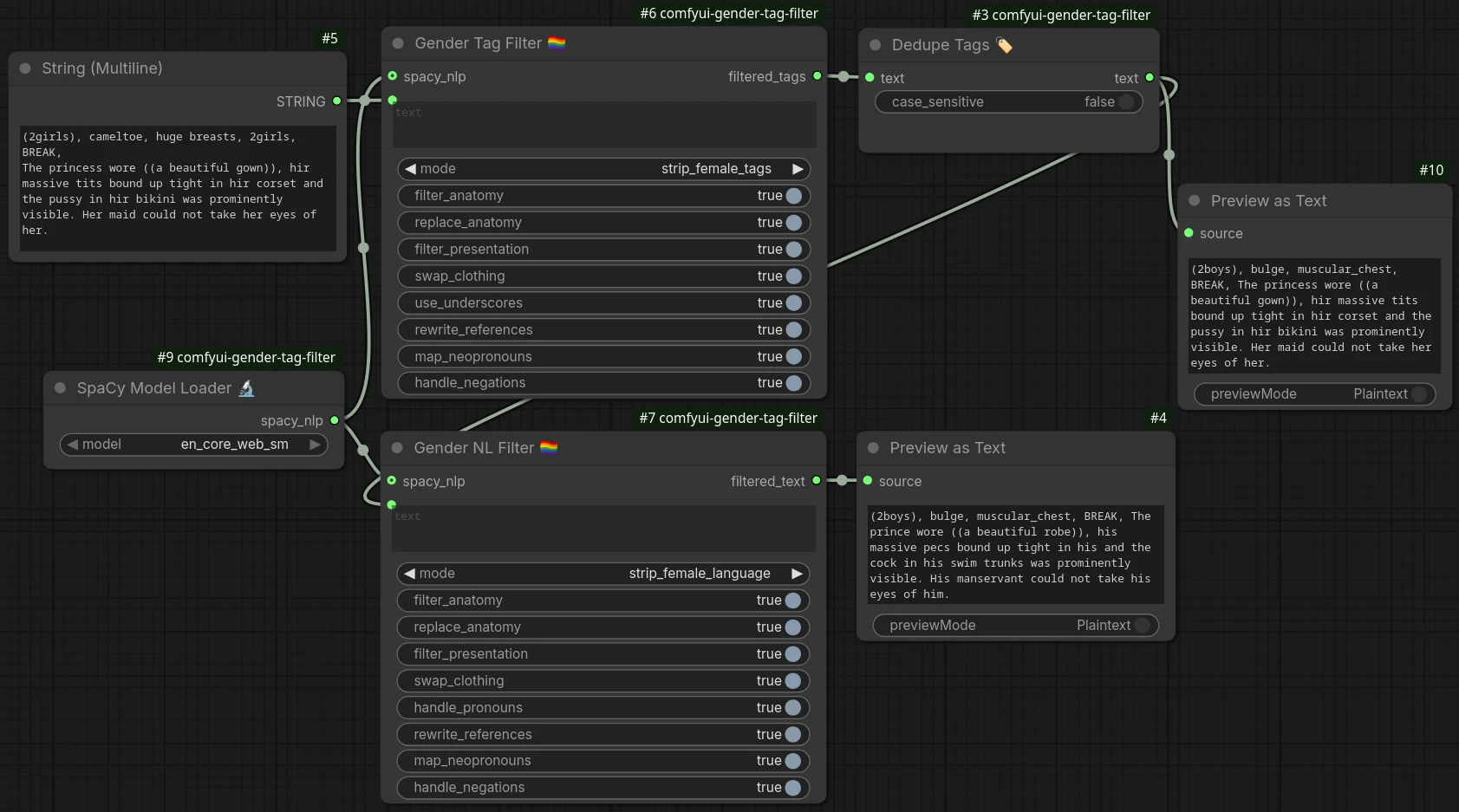
This pack contains four nodes, all found under utils/tags in the ComfyUI node browser. The gender filter nodes are designed to work independently or in series.
Filters gendered Danbooru and e621 style tag lists. Handles underscore and space separated tags, and is tolerant of inconsistent spacing around commas. Fully supports A1111/Forge emphasis syntax - (tag:1.3), ((tag)), [tag] are correctly parsed, filtered, and re-wrapped. LoRA, hypernetwork, and BREAK syntax are passed through untouched.
Backed by 145 female anatomy tags, 118 male anatomy tags, 152 female presentation tags, 112 clothing swap pairs, and 35 neopronoun entries - the most comprehensive gender vocabulary coverage of any ComfyUI tag filter.
Best used for: pure tag prompts, or as the first stage in a mixed tag+NL pipeline.
Filters and rewrites gendered vocabulary in natural language prompts or mixed tag+NL prompts. Uses spaCy for accurate negation detection, her pronoun disambiguation (possessive vs object), and plural they/them preservation, with automatic fallback to regex if spaCy is not installed.
Covers 128 female→male and 118 male→female word swaps, 111 NL clothing patterns, and cross-gender anatomy pairings (pussy ↔ cock, vagina ↔ penis, pecs ↔ breasts).
Best used for: natural language prompts, SillyTavern character card descriptions, or as the second stage after Gender Tag Filter.
Loads a spaCy language model and exposes it as a SPACY_NLP object that you wire into the spacy_nlp input on either filter node. Having a visible node in the graph makes it explicit whether spaCy is active - if the loader is not connected, both filter nodes automatically fall back to their built-in heuristic or regex processing.
If spaCy is not installed or the requested model is not downloaded, the loader raises a clear error with install instructions rather than silently doing nothing.
Best used for: any workflow where you want spaCy-backed accuracy for either or both filter nodes.
Removes duplicate tags from a comma-separated tag string, keeping the first occurrence of each. Treats underscores and spaces as equivalent so big_breasts and big breasts are correctly identified as the same tag regardless of which form upstream nodes produce. Emphasis-aware: (large_breasts:1.3) and large_breasts are correctly identified as duplicates. Case-insensitive by default.
Best used for: cleaning up merged tag strings before they reach the CLIP encoder, particularly after concatenating a static quality tag prefix with TIPO output.
- ComfyUI (latest recommended)
- Python 3.10–3.12 (comes with ComfyUI - see note below)
- (recommended) spaCy with at least one model installed - the filter nodes work without it but fall back to regex/heuristic mode
Warning
spaCy does not currently support Python 3.13 or 3.14.
spaCy depends on pydantic v1 and blis, neither of which build successfully on Python 3.13 or 3.14 as of this writing. If you are running ComfyUI under Python 3.13 or 3.14, the Gender NL Filter node will automatically fall back to regex mode and log a message in the console. Everything still works - you just won't get the accuracy benefits of spaCy until upstream support catches up.
If spaCy accuracy matters to you, create your ComfyUI venv explicitly under Python 3.12:
python3.12 -m venv venv
source venv/bin/activate   # Linux/Mac
# or
venv\Scripts\activate      # Windows
pip install spacy
python -m spacy download en_core_web_smClone or download this repository into your ComfyUI custom nodes folder:
cd ComfyUI/custom_nodes
git clone https://github.com/senjinthedragon/comfyui-gender-tag-filter
Or download the ZIP and extract it so the folder structure looks like this:
ComfyUI/custom_nodes/comfyui-gender-tag-filter/
    __init__.py
    gender_shared.py
    gender_tag_filter.py
    gender_nl_filter.py
    comfyui_dedupe_tags.py
    comfyui_spacy_loader.py
    README.md
Both filter nodes benefit from spaCy. The Gender NL Filter uses it for accurate negation detection and plural they/them disambiguation. The Gender Tag Filter uses it for more accurate detection of natural language fragments mixed into tag lists by TIPO. The nodes work without spaCy but accuracy is reduced in both cases.
pip install spacy
python -m spacy download en_core_web_sm
That's it. The SpaCy Model Loader detects all models installed in the current Python environment and lists them in its dropdown automatically - no folder management needed.
Tip
If you are running ComfyUI in a virtual environment, activate it before running the commands above. If you installed ComfyUI via the Windows portable package, use the python_embeded Python that ships with it:
.\python_embeded\python.exe -m pip install spacy
.\python_embeded\python.exe -m spacy download en_core_web_smAll four nodes will appear under utils/tags in the node browser after a restart.
Drop Gender Tag Filter between your prompt expander (e.g. TIPO, DedupeTags) and your CLIP encoder:
TIPO → DanbooruTagSnakeCaseFixer → IllustriousPromptSorter
     → StringConcatenate → [Dedupe Tags]
     → [Gender Tag Filter]
     → CLIPTextEncodeSDXL
Chain both nodes in series. The tag filter cleans the tag portion first, then the NL filter handles any natural language fragments:
... → DedupeTags → [Gender Tag Filter] → [Gender NL Filter] → CLIPTextEncodeSDXL
Since both nodes take a STRING input and return a STRING output, they wire together directly with no adapter nodes needed.
Tip
Add a SpaCy Model Loader node and wire its spacy_nlp output into the spacy_nlp input on either or both filter nodes to enable spaCy-backed processing. If the loader is not connected, the filter nodes fall back to their built-in heuristic/regex mode automatically. The loader is the clearest signal in your graph that spaCy is active.
| Input | Type | Default | Description |
|---|---|---|---|
text |
STRING | - | Tag string to filter |
mode |
dropdown | strip_female_tags |
strip_female_tags, strip_male_tags, format_only (apply use_underscores with no filtering), or off |
| Anatomy | |||
filter_anatomy |
boolean | true | Remove anatomical tags. Also scans compound tags for root words, so huge_breasts, breast_grab etc. are caught even if not individually listed. |
replace_anatomy |
boolean | false | Replace removed anatomy tags with gender-appropriate counterparts instead of deleting them. e.g. large_breasts → muscular_chest, breasts → pecs. No effect when filter_anatomy is off. |
| Clothing | |||
filter_presentation |
boolean | false | Remove gendered clothing, accessory, and makeup tags. Disable for crossdressing characters. |
swap_clothing |
boolean | true | When filter_presentation is on, replace clothing tags with equivalents instead of removing. e.g. skirt → trousers, bikini → swim_trunks, bra → removed. No effect when filter_presentation is off. |
| Output format | |||
use_underscores |
boolean | true | Output word separator style. On → big_breasts (Danbooru/e621, most models). Off → big breasts (some fine-tuned models). Input always accepted in either style. NL fragments bypass this entirely. |
| References | |||
rewrite_references |
boolean | true | Swap standalone gendered noun tags. woman → male, girl → boy, vixen → fox, doe → buck etc. Covers the same word set as the NL Filter for consistent behaviour across both nodes. |
| Pronouns | |||
map_neopronouns |
boolean | true | Map neopronoun tags (shi, hir, they, xe, ze, ey, fae etc.) to binary equivalents image models recognise. Same set as the NL Filter for consistent standalone behaviour. |
| Safety | |||
handle_negations |
boolean | true | Protect tags that appear in a negated context in mixed prompts from removal. Uses a 4-token proximity heuristic. |
| Backend (optional) | |||
spacy_nlp |
SPACY_NLP | - | Connect a SpaCy Model Loader node to enable spaCy-backed NL fragment detection. Leave disconnected to use the stop-word heuristic fallback instead. |
Outputs:
| Output | Type | Description |
|---|---|---|
filtered_tags |
STRING | The processed tag string |
| Input | Type | Default | Description |
|---|---|---|---|
text |
STRING | - | Prompt to filter |
mode |
dropdown | strip_female_language |
strip_female_language, strip_male_language, or off |
| Anatomy | |||
filter_anatomy |
boolean | true | Process anatomy words at all. Turn off to leave all anatomy language completely untouched. |
replace_anatomy |
boolean | true | Replace anatomy words with gender-appropriate counterparts rather than removing them. e.g. Her breasts bounced → His pecs bounced. Words with no clean equivalent are still removed. No effect when filter_anatomy is off. |
| Clothing | |||
filter_presentation |
boolean | true | Process clothing and accessory language at all. Turn off to leave all clothing language untouched. Useful for crossdressing characters. |
swap_clothing |
boolean | true | Replace clothing terms with equivalents rather than removing. e.g. dress → suit, skirt → trousers, bra → removed. No effect when filter_presentation is off. |
| Pronouns | |||
handle_pronouns |
boolean | true | Swap binary gendered pronouns. she/her/hers/herself ↔ he/him/his/himself |
rewrite_references |
boolean | true | Swap gendered nouns and adjectives. woman/girl/lady ↔ man/boy/guy etc. Also covers furry terms: vixen/doe/mare/tigress etc. |
map_neopronouns |
boolean | true | Map neopronouns to binary equivalents. Covers shi/hir (Chakat/furry), they/them, xe/xem, ze/zir, ey/em (Spivak), fae/faer. Plural they/them preserved by spaCy. |
| Safety | |||
handle_negations |
boolean | true | Protect negated anatomy terms. e.g. no breasts, without a vagina left untouched. spaCy uses dependency parsing; regex uses 4-token heuristic. |
| Backend (optional) | |||
spacy_nlp |
SPACY_NLP | - | Connect a SpaCy Model Loader node to enable spaCy-backed NLP processing. Leave disconnected to use the regex fallback instead. |
Outputs:
| Output | Type | Description |
|---|---|---|
filtered_text |
STRING | The processed prompt |
| Input | Type | Default | Description |
|---|---|---|---|
model |
dropdown | - | spaCy model to load. Populated automatically from all models installed in the current Python environment via spacy.util.get_installed_models(). Install a model with python -m spacy download <model_name> and restart ComfyUI. See spaCy model sizes for options. |
Outputs:
| Output | Type | Description |
|---|---|---|
spacy_nlp |
SPACY_NLP | The loaded spaCy model. Wire this into the spacy_nlp input on either filter node. |
| Input | Type | Default | Description |
|---|---|---|---|
text |
STRING | - | Comma-separated tag string to dedupe |
case_sensitive |
boolean | false | When off, Big_Breasts and big breasts are treated as the same tag. When on, only exact matches (after underscore/space normalisation) are deduped. |
Emphasis-wrapped duplicates are detected: (large_breasts:1.3) and large_breasts are treated as the same tag (first occurrence wins). LoRA syntax and BREAK keywords always pass through.
If your character is intentionally wearing clothing associated with a different gender, turn off filter_presentation on both nodes. This preserves all clothing tags and language while still removing anatomy tags that don't match your character. The tag filter's filter_presentation and the NL filter's filter_presentation work the same way - turning both off is the single switch for full crossdressing support.
| Model | Size | Notes |
|---|---|---|
en_core_web_sm |
~12 MB | Recommended. Good accuracy for prompt-length text. |
en_core_web_md |
~43 MB | Better word vectors, marginal improvement for this use case. |
en_core_web_lg |
~560 MB | Best accuracy. Worthwhile if you are processing longer character descriptions. |
Note
spaCy models are tiny compared to the checkpoints you are already running. The small model is 12MB. Your checkpoint is probably 6GB. Install spaCy.
Node doesn't appear in ComfyUI:
Make sure the folder is directly inside ComfyUI/custom_nodes/ and contains __init__.py. Restart ComfyUI fully after installing.
SpaCy Model Loader shows "(no spaCy models installed)":
Run python -m spacy download en_core_web_sm in the same Python environment as ComfyUI, then restart ComfyUI. If you are on the Windows portable package, use python_embeded\python.exe -m spacy download en_core_web_sm.
SpaCy Model Loader raises an error about spaCy not being installed:
Run pip install spacy in the same Python environment as ComfyUI, then download a model. If you are on the Windows portable package, use python_embeded\python.exe -m pip install spacy.
Compound tags like furry with non-furry or tongue out are being treated as natural language:
Update to v1.0.1 - this was a bug in the NL fragment detector's stop word list. Words like with, out, from, at were incorrectly flagged as natural language markers, causing common Danbooru compound tags to bypass underscore formatting.
Tags with spaces are not being matched:
Both nodes normalise tags internally - large breasts and large_breasts are treated as the same tag regardless of your use_underscores setting. If a tag is still slipping through, check that it is in the blocklist in gender_shared.py. The lists are plain Python sets and are easy to extend.
Negated anatomy is being removed anyway:
You are likely running on the regex fallback rather than spaCy. The regex heuristic scans 4 tokens back for a negation word, which covers most cases but not all sentence structures. Install spaCy for reliable negation detection.
Plural they/them is being swapped when it shouldn't be:
Same as above - this distinction requires spaCy. The regex fallback cannot reliably tell singular from plural they/them and will remap both.
spaCy fails to install with errors about blis, thinc, or pydantic:
You are most likely running Python 3.13 or 3.14. spaCy does not currently support either version due to incompatibilities in its pydantic v1 and blis dependencies. The blis build failure also triggers a secondary gcc error (unrecognized command-line option '-mavx512pf') on systems with gcc 14 or newer, which compounds the problem. The node will run correctly on the regex fallback in the meantime. To use spaCy, recreate your ComfyUI venv under Python 3.12 - see the Requirements section for instructions.
I'm a solo developer building tools to make AI-assisted roleplay and image generation better for the community. I maintain these projects in my free time, and any support is genuinely appreciated.
If this node pack saves you frustration, please consider:
- Sponsoring me on GitHub
- Buying me a coffee on Ko-fi
- Starring this repository to help others find it
This project is licensed under the MIT License.
