A comprehensive LabVIEW-based driver and application for real-time EEG (electroencephalography) data acquisition from the NeuroSky Mindwave Mobile headset via Bluetooth connectivity.


This project implements a complete LabVIEW driver stack for interfacing with NeuroSky Mindwave Mobile wearable EEG sensors. It establishes Bluetooth communication via an RN-4X module, processes raw EEG signals in real-time, and extracts meaningful brainwave metrics including meditation, attention, and frequency-band analysis (alpha, beta, gamma, delta, theta waves).
The application is designed for:
- EEG Research: Capture and analyze real-time brainwave data
- Neurofeedback Applications: Meditation and concentration monitoring
- Brain-Computer Interface (BCI) Development: Foundation for custom BCI applications
- Educational Projects: Learn signal processing and hardware integration
| Component | Purpose |
|---|---|
| NeuroSky Mindwave Mobile | Single-channel EEG sensor with built-in signal processing |
| RN-4X Bluetooth Module | Wireless serial communication interface |
| LabVIEW Runtime Engine | Application execution environment |
| Virtual COM Port Driver | Serial port emulation for Bluetooth |
Mindwave Headset (EEG)
        ↓
   Bluetooth (RN-4X Module)
        ↓
  Virtual COM Port
        ↓
  LabVIEW Application
        ↓
  Real-time Data Analysis
Neurosky LabVIEW/
├── docs/                            # images for this repo
│   ├── imgs/                         # image folder
│      ├── labview-logo.png            # labview logo
│      └── mindwave-mobile.jpg         # mindwave mobile box image
├── Neurosky LabVIEW.lvproj          # Main LabVIEW project file
├── Neurosky.vi                       # Main application VI
├── Neurosky.lvlib                    # Core library with reusable modules
├── Neurosky/                         # VIs organized by functionality
│   ├── MindwaveInit.vi              # Serial port initialization
│   ├── MindwaveClose.vi             # Serial port cleanup
│   ├── MindwaveStream.vi            # Real-time data acquisition loop
│   ├── MindwaveAUTO.vi              # Automatic data fetch (blocking mode)
│   ├── MindwaveReadByte.vi          # Low-level byte reading
│   ├── MindwaveParseData.vi         # Frame parsing (tiny/big packets)
│   ├── MindwaveGetPLENGTH.vi        # Extract payload length
│   ├── MindwaveGetPAYLOAD.vi        # Extract payload data
│   ├── MindwaveCmpChksum.vi         # Checksum validation
│   ├── MindwaveCompute2Bytes.vi     # Raw wave value conversion
│   ├── MindwaveCompute3Bytes.vi     # Brainwave metric conversion
│   ├── MindwavePrecise.vi           # Stream mode selection
│   └── imgs/                        # UI assets and logos
└── build/                           # Compiled executable and dependencies
    ├── Neurosky.exe                 # Standalone application
    ├── Neurosky.ini                 # Configuration file
    └── data/lvanlys.dll             # LabVIEW analysis library
The driver processes incoming Bluetooth data through a multi-stage pipeline:
MindwaveInit.vi → Opens virtual COM port
    ↓
MindwaveReadByte.vi → Reads one byte per iteration
MindwaveParseData.vi → Identifies frame boundaries
    ↓
Detects: Tiny Packets (Fast updates) OR Big Packets (Comprehensive data)
MindwaveGetPLENGTH.vi → Extracts frame length
    ↓
MindwaveGetPAYLOAD.vi → Extracts payload bytes
    ↓
MindwaveCmpChksum.vi → Validates integrity via checksum
Raw Bytes → MindwaveCompute2Bytes.vi → Signed Short (Raw EEG waves)
    ↓
Raw Bytes → MindwaveCompute3Bytes.vi → Unsigned Long (Brainwave bands)
MindwavePrecise.vi → User selects output type
    ├─ Raw Wave Data
    ├─ Brainwave Metrics (Alpha, Beta, Gamma, Delta, Theta)
    └─ High-Level Metrics (Meditation, Attention)
- LabVIEW 2013 or newer (Full development environment or Runtime Engine)
- NeuroSky Mindwave Mobile headset
- RN-4X Bluetooth Module (configured and paired)
- Windows OS (tested on Windows 7/10/11)
- Virtual COM Port drivers installed for your Bluetooth module
-
Pair the Bluetooth module with your computer:
- Open Settings → Bluetooth Devices
- Search for and connect to the RN-4X module
- Note the assigned COM port number (e.g., COM3)
-
Connect the headset:
- Power on the NeuroSky Mindwave Mobile
- Ensure it pairs with the RN-4X module
- Verify Bluetooth connection in system tray
git clone https://github.com/yourusername/Neurosky-LabVIEW.git
cd Neurosky-LabVIEW
Or download as ZIP and extract.
- Open Neurosky LabVIEW.lvproj in LabVIEW
- Open Neurosky.vi (main application)
- Locate the COM port selector control on the front panel
- Set it to the COM port assigned to your Bluetooth module (e.g., COM3)
- Set Baud Rate: 57600 (standard for Mindwave)
Option A: Development Mode
- In LabVIEW, click Run (▶ button) or press Ctrl+R
- Front panel displays real-time data
Option B: Compiled Executable
- Navigate to
build/folder - Double-click
Neurosky.exe - Configure COM port in the UI dialog
- Launch the application (VI or executable)
- Select COM port where your Mindwave is connected
- Click "Initialize" to open serial connection
- Put on the Mindwave headset (ensure good sensor contact)
- Click "Start Stream" to begin data acquisition
- Monitor real-time values on the front panel
- Single 8-bit value per sample
- Sampling rate: 512 Hz
- Frequency range: 3-100 Hz
- Use for: Custom signal processing, frequency analysis
- Delta (0.5-3 Hz): Deep sleep, emotional stability
- Theta (3-8 Hz): Meditation, creativity
- Alpha (8-12 Hz): Relaxation, calmness
- Beta (12-30 Hz): Active thinking, alertness
- Gamma (30-100 Hz): High-level cognitive processing
- Attention (0-100): Mental focus intensity
- Meditation (0-100): Relaxation level
- Signal Quality (0-200): Connection/sensor quality indicator
| Control | Type | Purpose |
|---|---|---|
| COM Port Selector | Input | Select Bluetooth virtual COM port |
| Baud Rate | Input | Serial communication speed (fixed: 57600) |
| Initialize Button | Input | Open serial connection |
| Start Stream | Input | Begin real-time data acquisition |
| Stop Stream | Input | Pause data streaming |
| Close Connection | Input | Gracefully close serial port |
| Raw Wave | Indicator | Real-time EEG waveform display |
| Meditation | Indicator | Current meditation level (0-100) |
| Attention | Indicator | Current attention level (0-100) |
| Signal Quality | Indicator | Sensor connectivity quality |
| Data Array | Output | Captured data for logging/analysis |
NeuroSky Mindwave EEG Real-Time Monitoring Demo
You can see the application in action in this demonstration video, showcasing real-time EEG data acquisition, brainwave metric visualization, and live meditation/attention level monitoring from the NeuroSky Mindwave Mobile headset.
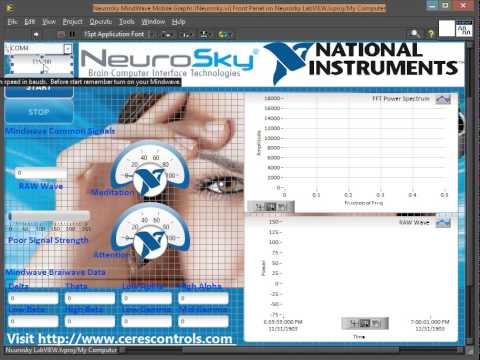
Demo Features:
- Real-time EEG signal acquisition via Bluetooth
- Live brainwave metric extraction (alpha, beta, gamma, delta, theta bands)
- Meditation and attention level visualization
- Signal quality monitoring and connection status
- Data streaming and logging capabilities
Use the Meditation metric to provide feedback when users achieve deep relaxation states.
Track attention levels during focused work sessions; alert when attention drops below threshold.
Capture raw wave data to disk for post-processing and frequency analysis (FFT, wavelet transform).
Use attention/meditation as continuous control signals for external devices or software.
Create interactive games where user brain activity controls game mechanics.
The Mindwave uses a proprietary serial protocol:
[SYNC] [SYNC] [PLENGTH] [PAYLOAD...] [CHECKSUM]
  0xAA   0xAA   (1 byte)   (variable)   (1 byte)
Tiny Packet (RAW wave data)
- Payload: 1 byte raw value
Big Packet (Complete metrics)
- Payload: Multiple value pairs with codec identifiers
- Contains: Brainwave bands, attention, meditation, signal quality
Checksum = (0xFF - (sum of all payload bytes & 0xFF)) & 0xFF
- Solution: Verify Bluetooth module is paired and virtual COM port driver is installed
- Check Device Manager for COM ports
- Try different COM port number in configuration
- Solution:
- Ensure Mindwave headset is powered on and paired
- Check sensor makes good contact with forehead
- Verify baud rate is set to 57600
- Restart both headset and Bluetooth module
- Solution:
- Move away from RF interference sources (WiFi, microwaves)
- Try moving Bluetooth module closer to headset
- Reinstall virtual COM port drivers
- Reduce baud rate if on unstable connection
- Solution:
- Ensure LabVIEW Runtime Engine is installed
- Check
build/Neurosky.iniconfiguration - Verify all dependencies in
build/data/folder exist
- GUI Enhancements: Implement real-time frequency spectrum visualization (FFT)
- Data Logging: Add SQLite database support for long-term data storage
- Multi-Headset Support: Extend to handle multiple simultaneous Mindwave devices
- Wireless Streaming: Network protocol for remote monitoring (UDP/TCP)
- Machine Learning: Integration with TensorFlow for EEG classification
- Mobile App: Companion mobile application for remote monitoring
- Advanced Filtering: Implement bandpass/notch filters for noise reduction
We welcome contributions! Please follow these guidelines:
- Fork the repository
- Create a feature branch:
git checkout -b feature/YourFeature - Implement changes following LabVIEW best practices
- Test thoroughly with real hardware
- Commit with clear messages:
git commit -m "Add feature: XYZ" - Push to branch:
git push origin feature/YourFeature - Submit a Pull Request with description of changes
Found a bug? Please open an issue with:
- Detailed description
- Steps to reproduce
- Hardware/software versions
- Error messages or screenshots
For questions, suggestions, or technical support:
- Project Issues: GitHub Issues
- NeuroSky Developer Documentation: neurosky.com/developer
- LabVIEW Documentation: ni.com/labview
- Email: [your-email@example.com]
- NeuroSky for the innovative Mindwave Mobile EEG sensor
- National Instruments for the powerful LabVIEW platform
- RoboND Program for inspiring documentation standards
- Community Contributors who have provided feedback and improvements
Version: 1.0.0.0 Last Updated: January 2026 Status: Stable / Production Ready
Contributing
Your contributions are always welcome! Please feel free to fork and modify the content but remember to finally do a pull request.
📱 Having Problems?









License