A comprehensive Delphi library with over 15 years of development, designed as a lightweight replacement for the mammoth Jedi library. Simple, crystal clear, non-obfuscated, fully commented and curated code. No (direct) external dependencies. Supports both VCL and FMX frameworks.
Due to a Claude "accident" all commit hashes have changed. If you cloned or forked this repository before April 5, 2025, Git will report "Unable to merge unrelated histories" when you try to pull. To fix this, run these commands in your local clone:
git fetch origin
git reset --hard origin/main
Warning: This will discard any local commits you made on top of the old history. If you have local changes you want to keep, back them up first:
# 1. Back up your local changes (adjust the number to match your local commits)
git format-patch -N main --stdout > my-local-changes.patch

# 2. Reset to the new history
git fetch origin
git reset --hard origin/main

# 3. Re-apply your changes
git am my-local-changes.patchThere are a gazillion of cool things this library can do for you. Here are only a few examples, and all from the Core/Base library (I am not even touching the higher-level libraries):
- Save your GUI state (checkboxes, radio buttons, edit boxes, etc.) to disk and then restore it when the application starts. All this with only 3 lines of code.
- Automatically translate your GUI to multiple languages via DeepL (no extra lines of code).
- Logging - Send color-coded messages to a log. The log will automatically pop up on errors, so the user can take action.
- AppData - A dramatically improved TApplication object that gives you lots and lots and lots of goodies such as "RunningHome", "RunningFirstTime", "BetaTesterMode", "CurrentUserDir", "LastUsedFolder"
- "AppData.SingleInstance" - prevent your program from running as multiple instances in a computer and pass the command line parameters to the already running instance.
- Uninstaller - The application writes itself in Windows "Add remove programs" so the user can uninstall it.
- App control: Restore, Restart, SelfDelete (useful for the uninstaller), RunSelfAtWinStartUp, HideFromTaskbar...
- etc etc etc
Most of this functionality can be achieved with maximum 3 lines of code.
Click the 'Watch' button if you want to get notified about updates. More libraries like this
The library is organized into packages grouped by framework and functionality:
Layer 1: LightCore.dpk              (Foundation - platform agnostic, RTL only)
    |
    +---> Layer 2: LightVcl.Common       (VCL utilities)
    |         |
    |         +---> Layer 3: LightVcl.Internet   (Downloads, email, HTML)
    |         |
    |         +---> Layer 4: LightVcl.Graphics   (Image processing, GDI, effects)
    |         |
    |         +---> Layer 5: LightVcl.Visual     (80+ visual components)
    |
    +---> Layer 2: LightFmxCommon        (FMX utilities)
              |
              +---> Layer 3: LightFmxVisual      (FMX visual components)
Each layer depends only on layers above it. LightCore has no external dependencies.
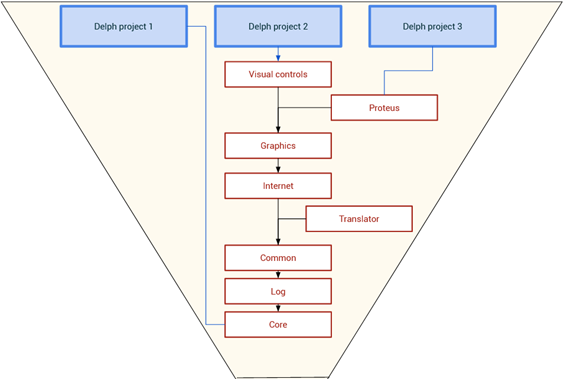
If you only need one library (for example, the Core library), you can of course delete the rest of the libraries. More about my libraries here.
Directory Structure
/LightCore*.pas          # Core RTL library
/FrameVCL/               # VCL-specific packages and units
/FrameFMX/               # FMX cross-platform packages and units
/Demo/                   # Demo applications
  /Core/                 # Core library demos
  /VCL/                  # VCL demos and templates
  /FMX/                  # FMX demos and templates
/UnitTesting/            # DUnitX test projects
/External/               # Optional 3rd-party libraries
/Updater/                # Self-update framework
/HardwareID/             # Hardware identification utilities
/System/                 # Copyright, EULA, credits
/Docs/                   # Architecture diagrams, logo
Packages
| Package | File | Description |
|---|---|---|
| Core | LightCore.dpk |
Platform-agnostic RTL (string manipulation, file I/O, logging, binary ops, streams, encoding) |
| VCL Common | FrameVCL/LightVcl.Common.dpk |
Windows utilities (registry, shell, dialogs, system info) |
| VCL Internet | FrameVCL/LightVcl.Internet.dpk |
Downloads (Indy, WinInet), email, HTML utilities |
| VCL Graphics | FrameVCL/LightVcl.Graphics.dpk |
Image processing, GDI, GIF, resize, effects |
| VCL Visual | FrameVCL/LightVcl.Visual.dpk |
80+ visual components, AppData, TrayIcon, StringGrid, etc. |
| FMX Common | FrameFMX/LightFmxCommon.dpk |
FMX utilities, AppData, styles, dialogs |
| FMX Visual | FrameFMX/LightFmxVisual.dpk |
FMX visual controls (AnimatedMemo, SearchListBox, SpinBox, etc.) |
| External | External/LightExternal.dpk |
Optional 3rd-party library wrappers |
Group project files:
LightSaberVCL.groupproj- All VCL packagesLightSaberFMX.groupproj- All FMX packages
- Minimum Delphi version: 12.3+ (requires the
$(Auto)compiler directive)
VCL projects: Double-click LightSaberVCL.groupproj to load it in Delphi.
FMX projects: Double-click LightSaberFMX.groupproj to load it in Delphi.
Core only: Open LightCore.dpk if you only need the RTL part of the library.
In Project Manager, right-click on the group (top) and select "Build all" in the popup menu. If you want to install also the visual components, right click on them and choose "Install". That's it.
By the grace of the $(Auto) compiler directive, the madness of "one package per Delphi version" is gone now.
(If you use an older Delphi edition that does not support the $(Auto) directive, just delete it and recompile.)
If the compiler complains about missing libraries like GR32, ThirdPartyLibs, janFX, Jpeg2000: these are 3rd party libraries. You can download them from the Internet OR simply ignore them. LightSaber can include or exclude those 3rd party libraries via conditional defines (see External Dependencies below).
The AppData system replaces the standard Delphi application lifecycle with a more powerful, cross-platform alternative.
Layer 1: TAppDataCore (LightCore.AppData.pas) - Platform-agnostic base
- Cross-platform path management (AppData folder, Documents, System folders)
- INI file handling for application settings
- Logging system (
TRamLog) with severity levels (Verb, Hint, Info, Warn, Error) - Single instance detection via
SingleInstClassName - First-run detection via
RunningFirstTimeproperty - BetaTester mode detection
- Command-line parameter handling
- Settings:
AutoStartUp,StartMinim,Minimize2Tray,Opacity,HintType
Layer 2: TAppData (LightFmx.Common.AppData.pas / LightVcl.Common.AppData.pas) - Framework-specific
- Extends TAppDataCore
- Form creation management via
CreateMainForm/CreateForm - AutoState queue system for form restoration (
asPosOnly,asFull,asNone) - Visual log window (
TfrmRamLog) - auto-created on demand - Platform-specific startup registration (Windows Registry, macOS LaunchAgents, Linux autostart)
- Application control:
Run(),Minimize(),Restart(),SelfDelete() - Dialog helpers:
PromptToSaveFile,PromptToLoadFile - Global instance:
AppData(freed in FINALIZATION)
Layer 3: TLightForm (LightFmx.Common.AppData.Form.pas / LightVcl.Common.AppData.Form.pas) - Self-saving forms
- Base class for all application forms (instead of TForm)
- Auto-saves form position/size/state to INI file on close
- Auto-restores position/size/state on load
AutoStateproperty controls save/restore behavior- Mobile toolbar support (back/next buttons for Android/iOS)
FormPreRelease- guaranteed single-call cleanup eventCloseOnEscapeproperty- Event order:
Loaded→FormCreate→FormPreRelease→SaveForm
Initialization Pattern:
begin
  AppData:= TAppData.Create('AppName', 'UniqueWindowClassName', MultiThreaded);
  AppData.CreateMainForm(TMainForm, MainForm, asPosOnly);
  AppData.CreateForm(TSecondForm, SecondForm, asFull);
  AppData.Run;  // Sets Initializing:= FALSE
end.
AppData replaces Application.Initialize and Application.CreateForm — it manages the entire lifecycle, queuing forms and providing consistent cross-platform behavior with automatic save/restore.
Key Properties:
AppData.Initializing: TRUE during startup, FALSE afterRun()— prevents saving corrupted state during initializationAppData.RunningHome: TRUE if .dpr file exists (development mode)AppData.RunningFirstTime: TRUE if INI file doesn't exist yetAppDataCore.AppName: Central identifier used for INI filename, AppData folder name, etc.
Path Helpers:
AppDataFolder(): User+App specific (e.g.,C:\Users\Name\AppData\Roaming\AppName\)AppFolder(): Where EXE resides (on mobile: Documents folder)IniFile():AppDataFolder + AppName + '.ini'- Cross-platform: handles Windows/macOS/iOS/Android differences automatically
Form AutoState System:
asNone: No auto-save/restoreasPosOnly: Save/restore position only (Left, Top)asFull: Save/restore position + all GUI controls (checkboxes, etc.)asUndefined: Error — must be set viaCreateForm
GUI State Persistence
Save/restore entire form state with two lines of code:
// In FormDestroy
SaveForm(Self);

// After form creation
LoadForm(Self);
A full demo app that demonstrates how to save/load the GUI with just two lines of code can be found here: github.com/GodModeUser/Dephi-LightSaber-GUI_AutoSave
Auto-Translation
Translator := TTranslator.Create;
Translator.LoadLastTranslation;  // Shows language dialog on first run
Mark controls that shouldn't be translated with Tag=128.
Application Data
uses LightVcl.Common.AppData;  // or LightFmx.Common.AppData

AppData.RunningFirstTime  // True on first launch
AppData.AppDataFolder     // User's AppData path
AppData.LastUsedFolder    // Last folder user selected
Logging
uses LightCore.LogRam;

Log.Write('Message');           // Standard message
Log.WriteError('Error text'); // Error (triggers log popup)Unit naming follows the pattern: Light<Framework>.<Layer>.<Feature>.pas
| Prefix | Description |
|---|---|
LightCore.* |
Core RTL (cross-platform) |
LightVcl.Common.* |
VCL utilities |
LightVcl.Internet.* |
VCL Internet |
LightVcl.Graphics.* |
VCL image processing |
LightVcl.Visual.* |
VCL visual components |
LightFmx.Common.* |
FMX utilities |
LightFmx.Visual.* |
FMX visual components |
LightCore.pas Over 200 functions for:
- String manipulation (string conversions, sub-string detection, word manipulation, cut, copy, split, wrap, etc.)
- Programmer's helper
- Form manipulation
- Advanced/easy message boxes
- DateTime utilities
- etc etc etc etc etc etc etc
LightCore.IO.pas Super useful functions for file/folder/disk manipulation:
- Copy files
- File/Folder Exists
- Get special Windows folders (My Documents, etc.)
- Prompt the user to select a file/folder
- List specified files (.jpg for ex) in a folder and all its sub-folders
- Increment the numbers in a filename (good for incremental backups)
- Append strings to file name
- Read text from files to a string variable
- Compare files
- Merge files
- Sort lines in a file
- Drive manipulation (IsDiskInDrive, etc)
- etc
LightCore.AppData.pas Application-wide functions:
- Get application's %AppData% folder (the folder where you save temporary, app-related and ini files)
- Get application's command line parameters
- Detect if the application is running for the first time on a computer
- Application self-restart
- Application self-delete
- etc
LightCore.StreamBuff.pas Extends TBufferedFileStream. This class adds new functionality that does not exist in Delphi's original stream classes:
- Read/WriteBoolean
- Read/WriteString (Ansi/Unicode)
- Read/WriteInteger
- Read/WriteCardinal
- Read/WriteDate
- Read/Write mac files (inverted byte endianness)
- etc It may be used as a drop-in replacement for TFileStream.
LightCore.Binary.pas
- String to hex, hex to string conversions (and many others)
- Binary numbers (endianness) swapping
- Data serialization
- Bit manipulation (set bit, etc)
- Reverse bits
- Endianness
- etc
LightCore.INIFile.pas Features:
- Extends the capabilities of TIniFile
- Functions for easily accessing the application's default INI file
Demo apps in /Demo/ serve as both tests and documentation:
| Category | Demo | Description |
|---|---|---|
| Core | DemoLightCore | Main core functionality showcase |
| Core | Demo_Binary1/2/3 | Binary serialization examples |
| Core | Demo_ccIO | File I/O operations |
| Core | Demo_FileStream | Stream buffer usage |
| Core | Demo_Internet | Internet functionality |
| VCL | VCL_Demo_VisualControls | All 80+ VCL components |
| VCL | VCL_Demo_SaveGUI | GUI state autosave |
| VCL | VCL_Demo_Log | Logging framework |
| VCL | VCL_Demo_SystemReport | System information report |
| VCL | VCL_Demo_WinVers | Windows version detection |
| VCL | VCL_Demo_CreationOrder | Form creation order demo |
| VCL | VCL_Demo_cGraphText | Graphics text rendering |
| VCL | VCL_TemplateFull/Simple/Micro | App templates (full, simple, minimal) |
| VCL | VCL_Uninstaller | Universal uninstaller template |
| FMX | FMX_Demo_Log | FMX logging |
| FMX | FMX_Demo_MessageBoxes | Message box variants |
| FMX | FMX_Demo_SearchBoxes | Search and filter controls |
| FMX | FMX_Demo_Styles | FMX styles |
| FMX | FMX_Demo_AnimatedTextMemo | Animated text memo control |
| FMX | FMX_Demo_AutoSizeRect | Auto-sizing rectangle |
| FMX | FMX_Demo_LightPanel | LightPanel component |
| FMX | FMX_Demo_SystemReport | FMX system report |
| FMX | FMX_Demo_ColorPalette | Color palette control |
| FMX | FMX_MinimalApp | FMX app templates (3 variants) |
The UnitTesting/ folder contains DUnitX-based unit tests with TestInsight support (160 test units across 8 test projects).
| Test Project | Tests Package | Status |
|---|---|---|
Tests_LightCore.dpr |
LightCore.dpk |
876 tests |
Tests_LightVcl.Common.dpr |
LightVcl.Common.dpk |
68 tests |
Tests_LightVcl.Forms.dpr |
LightVcl.Visual.dpk (forms) |
161 tests |
Tests_LightVcl.Graphics.dpr |
LightVcl.Graphics.dpk |
Available |
Tests_LightVcl.Internet.dpr |
LightVcl.Internet.dpk |
Available |
Tests_LightVcl.Visual.dpr |
LightVcl.Visual.dpk (components) |
Available |
Tests_LightVcl.Translator.dpr |
Translator | Available |
Tests_LightFmx.dpr |
FMX packages | Available |
Running Tests
- Open the test project in Delphi
- With TestInsight (recommended): Define
TESTINSIGHTin project options, run from IDE - Without TestInsight: Build and run as console application
Each test project has a corresponding build script (e.g. Build_Tests_LightCore.cmd).
| Platform | VCL | FMX |
|---|---|---|
| Win32/Win64 | Full | Full |
| Android64 | N/A | Full |
| macOS/OSXARM64 | N/A | Partial |
| iOS | N/A | Not tested |
This library follows strictly the following programming standards:
- Zero tolerance for global variables
- Zero tolerance for compiler hints and warnings
- Zero tolerance for swallowed exceptions
- Zero tolerance for memory leaks
- Zero tolerance Application.ProcessMessages
- No "use after free"
- Avoid multithreading whenever possible
- Avoid "magic values"
- Consistent code formatting - most of the formatting respects the Embarcadero recommendations. A noticeable exception is if/then/else.
- Consistent file naming
Some parts (especially the graphic part) of LightSaber depend on these external libraries:
- PasJpeg2000
- jpegdec
- Graphics32
The dependencies are not disabled by default but you can disable them. So, in the end you can compile without them.
To enable the support for the above-mentioned features, install the libraries (see links below) and then add these "defines" to your project's settings: Jpg2000;GR32.
The "Conditional defines" field is located in Project Options: Right-click your project, and choose "Project options -> Delphi compiler -> All configurations -> Conditional defines".
This library is freeware (see included copyright notice). I don't ask for money, not even donations for this library, but you can help me by spreading the word.
This library will be expanded if it gets enough stars:
- Click the 'Star' button (top-right corner) if you like this library.
- More than 100 files are waiting to be cured and added.
Details in System\Copyright.txt
The code is nicely documented. Each method has a comment on top of it.
Some units have FULL documentation at the top and code/usage examples.
Complex classes have testing code that can be used also as demo (example of usage) programs. Check the /Demo/ folder.
I also started a new video channel. I will post a new video every time this library collects 100 stars.
https://www.youtube.com/watch?v=a9nZiDXYmIo
All documentation is in English.