UIKit v3 for React is now available. UIKit v3 has a dependency on Chat SDK v4. Before migrating UIKit v2 to v3, refer to the migration guide of Chat SDK v4 for JavaScript for any breaking changes. The Chat SDK must be updated first before proceeding with the latest version of UIKit.
The biggest change from v2 to v3 is modularization, which allows you to build and customize views at a more minute level. You can execute key messaging functions, such as list channels, through modules. The smart components in v2 have now become modules that consist of separate providers and UI components. While the provider manages all the data of each module, the UI component renders user interfaces that are used to display the view of the module. The provider and UI components exchange data using context hooks. This new architecture allows for easier and more detailed customization.
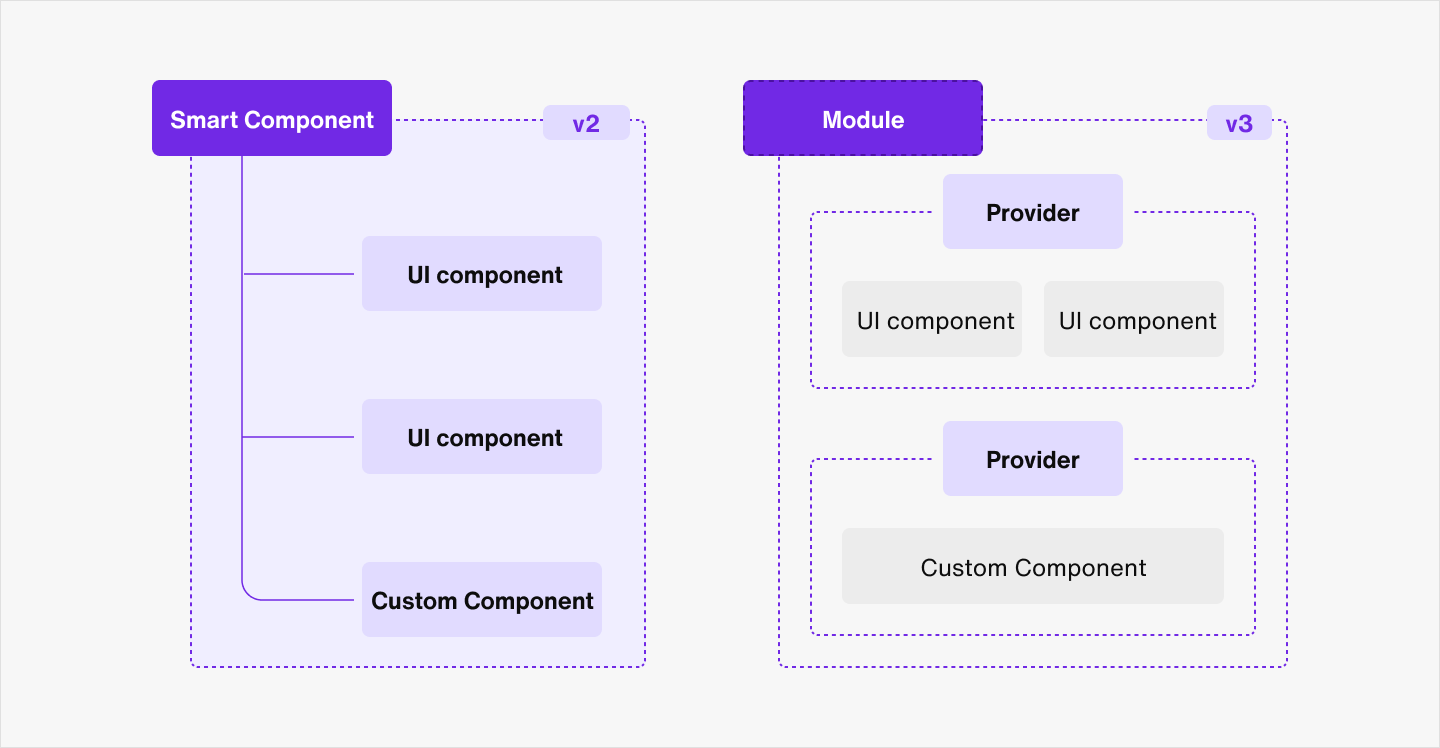
When migrating from v2 to v3, there are several breaking changes you need to remember. While the properties of the smart components have relatively remained the same in the modules, some arguments in the render props have been removed. Refer to the breaking changes below.
You can execute key chat functions through various modules provided by UIKit for React. In each module, there is a provider, a set of pre-built UI components, and a context hook that allows access to the provider's data. Refer to the table below to see which modules we provide and the components that make up each module.
| Module | Provider | Context hook | UI components |
|---|---|---|---|
| Channel list | ChannelListProvider | useChannelListContext | ChannelListUI ChannelListHeader ChannelPreview |
| Group channel | ChannelProvider | useChannelContext | ChannelUI ChannelHeader MessageInput MessageList Message FileViewer FrozenNotification RemoveMessageModal TypingIndicator UnreadCount |
| Group channel settings | ChannelSettingsProvider | useChannelSettingsContext | ChannelSettingsUI AdminPanel UserPanel ChannelProfile EditDetailsModal exitChannel UserListItem |
| Open channel | OpenChannelProvider | useOpenChannelContext | OpenChannelUI OpenChannelHeader OpenChannelInput OpenChannelMessageList OpenChannelMessage FrozenChannelNotification |
| Open channel settings | OpenChannelSettingsProvider | useOpenChannelSettingsContext | OpenChannelSettingsUI OpenChannelProfile OperatorUI ParticipantUI EditDetailsModal |
| Message search | MessageSearchProvider | useMessageSearchContext | MessageSearchUI |
| Create a channel | CreateChannelProvider | useCreateChannelContext | CreateChannelUI InviteMembers SelectChannelType |
| Edit user profile | EditUserProfileProvider | useEditUserProfileContext | EditUserProfileUI |
See the breaking changes below for sendbirdSelectors and all modules.
The following table shows what common changes were made to the whole UIKit from v2 to v3.
| From v2 | To v3 |
|---|---|
| npm install sendbird-uikit | npm i @sendbird/uikit-react |
| sendbird-uikit/dist/index.css | @sendbird/uikit-react/dist/index.css |
| SendBirdProvider | SendbirdProvider |
| sendBirdSelectors | sendbirdSelectors |
| withSendBird() | withSendbird() |
The import path for sendbirdSelectors has changed after the name changed as shown in the code below.
import { sendBirdSelectors } from 'sendbird-uikit';import sendbirdSelectors from '@sendbird/uikit-react/sendbirdSelectors';A new interface called UIKitMessageHandler has been added in sendbirdSelectors for handling message events when sending a message. There are three options in the handler as shown in the code below.
const globalStore = useSendbirdStateContext();
const sendUserMessage = sendbirdSelectors.sendUserMessage(globalStore);

sendUserMessage(channel, { message: 'Hello world' })
	.onPending((message) => { })
	.onFailed((error, message) => { })
.onSucceeded((message) => { })The folllowing methods have been added for retrieving a channel instance.
| Method name | Description |
|---|---|
| getGetGroupChannel | Specifies a method that returns a Promise instance to retrieve a GroupChannel instance. |
| getGetOpenChannel | Specifies a method that returns a Promise instance to retrieve an OpenChannel instance. |
const getGroupChannel = sendbirdSelectors.getGetGroupChannel(globalStore);
getGroupChannel('channel-url')
	.then((channel) => {})
	.catch((error) => {})

const getOpenChannel = sendbirdSelectors.getGetOpenChannel(globalStore);
getOpenChannel('channel-url')
	.then((channel) => {})
.catch((error) => {})The getSendUserMessage method and the getOpenChannelSendUserMessage method have combined into one getSendUserMessage. This method generates a function that returns UIKitMessageHandler to send user messages in group channels and open channels.
const sendUserMessage = sendBirdSelectors.getSendUserMessage(store);
const params = new sdk.UserMessageParams();
sendUserMessage('channel-url', params)
	.then((message) => {})
	.catch((error) => {})
const sendUserMessage = sendbirdSelectors.getSendUserMessage(globalStore);
sendUserMessage(channel, {} as UserMessageCreateParams)
.onPending((message) => {})
.onFailed((error, message) => {})
.onSucceeded((message) => {})The getSendFileMessage method and the getOpenChannelSendFileMessage method have combined into one getSendFileMessage. This method generates a function that returns UIKitMessageHandler to send file messages in group channels and open channels.
const sendFileMessgae = sendBirdSelectors.getSendFileMessage(store);
const params = new sdk.FileMessageParams();
sendFileMessage('channel-url', params)
	.then((message) => {})
	.catch((error) => {})
const sendFileMessage = sendbirdSelectors.getSendFileMessage(globalStore);
sendFileMessage(channel, {} as FileMessageCreateParams)
.onPending((message) => {})
.onFailed((error, message) => {})
.onSucceeded((message) => {})The parameter of getFreezeChannel changed from channel-url to GroupChannel or OpenChannel.
const freezeChannel = sendBirdSelectors.getFreezeChannel(store);
freezeChannel('channel-url')
	.then(() => {})
	.catch((error) => {})
const freezeChannel = sendbirdSelectors.getFreezeChannel();
freezeChannel(channel: GroupChannel | OpenChannel)
.then(() => {})
.catch(() => {})The parameter of getUnfreezeChannel changed from channel-url to GroupChannel or OpenChannel.
const unfreezeChannel = sendBirdSelectors.getUnfreezeChannel(store);
unfreezeChannel('channel-url')
	.then(() => {})
	.catch((error) => {})
const unfreezeChannel = sendbirdSelectors.getUnfreezeChannel();
unfreezeChannel(channel: GroupChannel | OpenChannel)
.then(() => {})
.catch(() => {})| From v2 | To v3 |
|---|---|
| getCreateChannel | getCreateGroupChannel |
When you call the getCreateGroupChannel method, it returns a Promise instance to create a new group channel.
const createChannel = sendBirdSelectors.getCreateChannel(store);
const params = new sdk.GroupChannelParams();
createChannel(params)
	.then((channel) => {})
	.catch((error) => {})
const createGroupChannel = sendbirdSelectors.getCreateGroupChannel(globalStore);
createGroupChannel({} as GroupChannelCreateParams)
.then((channel) => {})
.catch((error) => {})When you call the getCreateOpenChannel method, it returns a Promise instance to create a new open channel.
const createOpenChannel = sendBirdSelectors.getCreateOpenChannel(store);
const params = new sdk.OpenChannelParams();
createOpenChannel(params)
	.then((channel) => {})
	.catch((error) => {})
const createOpenChannel = sendbirdSelectors.getCreateOpenChannel(globalStore);
createOpenChannel({} as OpenChannelCreateParams)
.then((channel) => {})
.catch((error) => {})| From v2 | To v3 |
|---|---|
| getEnterChannel | getEnterOpenChannel |
When you call the getEnterOpenChannel method, it returns a Promise instance to enter an open channel.
const enterChannel = sendBirdSelectors.getEnterChannel(store);
enterChannel('channel-url')
	.then((channel) => {})
	.catch((error) => {})
const enterOpenChannel = sendbirdSelectors.getEnterOpenChannel(globalStore);
enterOpenChannel('channel-url')
.then((channel) => {})
.catch((error) => {})| From v2 | To v3 |
|---|---|
| getExitChannel | getExitOpenChannel |
When you call the getExitOpenChannel method, it returns a Promise instance to exit an open channel.
const exitChannel = sendBirdSelectors.getExitChannel(store);
exitChannel('channel-url')
	.then((channel) => {})
	.catch((error) => {})
const exitOpenChannel = sendbirdSelectors.getExitOpenChannel(globalStore);
exitOpenChannel('channel-url')
.then((channel) => {})
.catch((error) => {})The getUpdateUserMessage method and the getOpenChannelUpdateUserMessage method have combined into one getUpdateUserMessage. This method generates a function that returns a Promise instance to update user messages in group channels and open channels.
const updateUserMessage = sendBirdSelectors.getUpdateUserMessage(store);
const params = new sdk.UserMessageParams();
updateUserMessage('channel-url', 'message-id(number)', params)
	.then((message) => {})
	.catch((error) => {})
const updateUserMessage = sendbirdSelectors.getUpdateUserMessage(globalStore);
updateUserMessage(channel, 'message-id(number)', {} as UserMessageUpdateParams)
.then((message) => {})
.catch((error) => {})The getDeleteMessage method and the getOpenChannelDeleteMessage method have combined into one getDeleteMessage. This method generates a function that returns a Promise instance to delete messages in group channels and open channels.
const deleteMessage = sendBirdSelectors.getDeleteMessage(store);
deleteMessage('channel-url', message)
	.then((message) => {})
	.catch((error) => {})
const deleteMessge = sendbirdSelectors.getDeleteMessage(globalStore);
deleteMessage(channel, message)
.then((message) => {})
.catch((error) => {})The getResendUserMessage method and the getOpenChannelResendUserMessage method have combined into one getResendUserMessage. This method generates a function that returns a Promise instance to resend user messages in group channels and open channels.
const resendUserMessage = sendBirdSelectors.getResendUserMessage(store);
resendUserMessage('channel-url', failedMessage)
	.then((message) => {})
	.catch((error) => {})
const resendUserMessage = sendbirdSelectors.getResendUserMessage(globalStore);
resendUserMessage(channel, failedMessage)
.then((message) => {})
.catch((error) => {})The getResendFileMessage method and the getOpenChannelResendFileMessage method have combined into one getResendFileMessage. This method generates a function that returns a Promise instance to resend file messages in group channels and open channels.
const resendFileMessage = sendBirdSelectors.getResendFileMessage(store);
resendFileMessage('channel-url', failedMessage)
	.then((message) => {})
	.catch((error) => {})
const resendFileMessage = sendbirdSelectors.getResendFileMessage(globalStore);
resendFileMessage(channel, failedMessage)
.then((message) => {})
.catch((error) => {})The ChannelList smart component has now become ChannelList module. See the codes below on how to import the new channel list module.
import { ChannelList } from "sendbird-uikit";import ChannelList from "@sendbird/uikit-react/ChannelList"
// Or
import { ChannelList } from "@sendbird/uikit-react"The following table lists properties that were added to the ChannelList module.
| Property name | Type | Description |
|---|---|---|
| renderPlaceHolderError | React.ReactElement | Renders a customized placeholder for error messages in the channel list. (Default: null) |
| renderPlaceHolderLoading | React.ReactElement | Renders a customized placeholder for loading messages in the channel list. (Default: null) |
| renderPlaceHolderEmptyList | React.ReactElement | Renders a customized placeholder message for when the channel list is empty. (Default: null) |
The Channel smart component has now become Channel module. See the codes below on how to import the new group channel module.
import { Channel } from "sendbird-uikit";import Channel from "@sendbird/uikit-react/Channel"
// Or
import { Channel } from "@sendbird/uikit-react"The following table lists properties of the Channel module that were renamed.
| From v2 | To v3 |
|---|---|
| useReaction | isReactionEnabled |
| useMessageGrouping | isMessageGroupingEnabled |
The following render props have been removed from UIKit v3:
renderCustomMessagerenderChatItem
See the code below on how to implement message-related actions in a group channel using the sendbirdSelectors component.
import { Channel, SendbirdProvider } from "sendbird-uikit";

const MyCustomChatMessage = ({ message, onDeleteMessage, onUpdateMessage }) => (
	<div>
		{message.message}
		<button onClick={() => {
			const callback = () => { console.warn('message deleted'); }
			onDeleteMessage(message, callback);
			}}
			> // Delete message.
		</button>
		<button onClick={() => {
			const updatedMessage = Math.random().toString();
			const callback = () => { console.warn('message updated'); }
			onUpdateMessage(message.messageId, updatedMessage, callback);
			}}
			> // Update message.
		</button>
	</div>
);

const App = () => (
	<SendbirdProvider appId={appId} userId={userId}>
		<div style={{ height: '500px' }}>
			<Channel channelUrl={channelUrl} renderChatItem={MyCustomChatMessage} />
		</div>
	</SendbirdProvider>
);<Channel
renderMessage={MyFileMessageComponent}
/>
const MyFileMessageComponent = ({ message, chainTop, chainBottom }) => {
const {
currentGroupChannel,
scrollToMessage,
} = useChannelContext();
const globalStore = useSendbirdStateContext();
// Use sendbirdSelectors and globalStore to implement onDeleteMessage, onUpdateMessage, onResendMessage.
const deleteFileMessage = sendbirdSelectors.getDeleteMessage(globalStore);
if (message.messageType === 'file') {
return (
<div className="custom-file-message">
<button
className="custom-file-message__delete-button"
onClick={deleteFileMessage(currentGroupChannel, message)}
/>
... // Implement your code here.
</div>
)
}
return null;
}| Render prop | From v2 | To v3 |
|---|---|---|
| renderMessageInput | ({ channel, user, disabled, quoteMessage }) => React.ReactElement | () => React.ReactElement |
| renderChannelHeader | renderChatHeader?: ({ channel, user }) => React.ReactElement | renderChannelHeader?: () => React.ReactElement |
See the code below on how to render the MessageInput component with useChannel context hook and implement message-related actions in the channel using the sendbirdSelectors component.
<Channel
  renderMessageInput={MyMessageInput}
/>
const MyMessageInput = ({message, chainTop, chainBottom }) => {
  const {
    currentGroupChannel,
  } = useChannelContext();
  const globalStore = useSendbirdStateContext();
  // Use `sendbirdSelectors` and `globalStore` to implement `getSendUserMessage` and `getSendFileMessage`.
  const sendUserMessage = sendbirdSelectors.getSendUserMessage(globalStore);
  return (
    ...
  );
}See the code below on how to render channel header with useChannel.
<Channel
  renderMessageInput={MyChannelHEader}
/>
const MyChannelHEader = () => {
  const {
    currentGroupChannel,
  } = useChannelContext();
  const globalStore = useSendbirdStateContext();
  const user = globalStore?.stores?.userStore?.user;
  return (
    ...
  );
}The following table lists properties that were added to the Channel module.
| Property name | Type | Description |
|---|---|---|
| renderPlaceholderLoader | React.ReactElement | Renders a customized placeholder for loading messages in the channel. (Default: null) |
| renderPlaceholderInvalid | React.ReactElement | Renders a customized placeholder for invalid channel state. (Default: null) |
| renderPlaceholderEmpty | React.ReactElement | Renders a customized placeholder for an empty channel. (Default: null) |
| renderChannelHeader | React.ReactElement | Renders a customized channel header component. (Default: null) |
| renderMessage | React.ReactElement | Renders a customized message view in the channel. (Default: null) |
| renderMessageInput | React.ReactElement | Renders a customized message input component. (Default: null) |
| renderTypingIndicator | React.ReactElement | Renders a customized typing indicator component. (Default: null) |
| renderCustomSeparator | React.ReactElement | Renders a customized date separator view in the message list component. (Default: null) |
The ChannelSettings smart component has now become ChannelSettings module. See the codes below on how to import the new group channel settings module.
import { ChannelSettings } from "sendbird-uikit";import ChannelSettings from "@sendbird/uikit-react/ChannelSettings"
// Or
import { ChannelSettings } from "@sendbird/uikit-react"| Render prop | From v2 | To v3 |
|---|---|---|
| renderChannelProfile | ({ channel }) => React.ReactElement | () => React.ReactElement |
See the code below on how to render channel header with useChannelSettingsContext.
<ChannelSettings
  renderChannelProfile={MyChannelProfile}
/>
const MyChannelProfile = () => {
  const { channel } = useChannelSettingsContext();
  return (...);
}The following table lists properties that were added to the ChannelSettings module.
| Property name | Type | Description |
|---|---|---|
| renderPlaceHolderError | React.ReactElement | Renders a customized placeholder for error messages that occur in the channel settings menu. (Default: null) |
| renderModerationPanel | React.ReactElement | Renders a customized view of the moderation panel that displays the moderation tools for channel operators. (Default: null) |
| renderexitChannel | React.ReactElement | Renders a customized leave channel button in the settings module. (Default: null) |
The OpenChannel smart component has now become OpenChannel module. See the codes below on how to import the new open channel module.
import { OpenChannel } from "sendbird-uikit";import OpenChannel from "@sendbird/uikit-react/OpenChannel"
// Or
import { OpenChannel } from "@sendbird/uikit-react"| Render prop | From v2 | To v3 |
|---|---|---|
| renderChannelTitle | ({channel, user}) => React.ReactElement | () => React.ReactElement |
| renderMessageInput | ({channel, user, disabled}) => React.ReactElement | () => React.ReactElement |
| From v2 | To v3 |
|---|---|
| renderCustomMessage | renderMessage |
| experimentalMessageLimit | messageLimit |
| useReaction | isReactionEnabled |
| useMessageGrouping | isMessageGroupingEnabled |
See the code below on how to render the MessageInput component with useOpenChannelContext context hook and implement message-related actions in the channel using the sendbirdSelectors component.
<OpenChannel
  renderInput={MyMessage}
/>
const MyMessageInput = () => {
  // Use `useOpenChannelContext` to access current channel.
  const {
    currentOpenChannel,
  } = useOpenChannelContext();
  const globalStore = useSendbirdStateContext();
  // Use `sendbirdSelectors` and `globalStore` to implement `getSendUserMessage` and `getSendFileMessage`.
  const sendMessage = sendbirdSelectors.getSendUserMessage(globalStore);
  return (
    ...
  );
}The following table lists properties that were added to the OpenChannel module.
| Property name | Type | Description |
|---|---|---|
| renderMessage | React.ReactElement | Renders a customized message view in the channel. (Default: null) |
| renderHeader | React.ReactElement | Renders a customized channel header component. (Default: null) |
| renderInput | React.ReactElement | Renders a customized message input component. (Default: null) |
| renderPlaceholderEmptyList | React.ReactElement | Renders a customized placeholder for an empty channel. (Default: null) |
| renderPlaceHolderError | React.ReactElement | Renders a customized placeholder for error messages that occur in the channel. (Default: null) |
| renderPlaceholderLoading | React.ReactElement | Renders a customized placeholder for loading messages in the channel. (Default: null) |
The OpenChannelSettings smart component has now become OpenChannelSettings module. See the codes below on how to import the new open channel settings module.
import { OpenChannelSettings } from "sendbird-uikit";import OpenChannelSettings from "@sendbird/uikit-react/OpenChannelSettings"
// Or
import { OpenChannelSettings } from "@sendbird/uikit-react"| From v2 | To v3 |
|---|---|
| renderChannelProfile | renderOperatorUI, renderParticipantList |
The following table lists properties that were added to the OpenChannelSettings module.
| Property name | Type | Description |
|---|---|---|
| renderOperatorUI | React.ReactElement | Renders a customized view of the channel settings for operators. (Default: null) |
| renderParticipantList | React.ReactElement | Renders a customized view of the channel settings for non-operator members. (Default: null) |
The MessageSearch smart component has now become MessageSearch module. See the codes below on how to import the new message search module.
import { MessageSearch } from "sendbird-uikit";import MessageSearch from "@sendbird/uikit-react/MessageSearch"
// Or
import { MessageSearch } from "@sendbird/uikit-react"The following table lists properties that were added to the MessageSearch module.
| Property name | Type | Description |
|---|---|---|
| renderPlaceHolderError | React.ReactElement | Renders a customized placeholder for error messages that occur in the search result. (Default: null) |
| renderPlaceholderLoading | React.ReactElement | Renders a customized placeholder for loading messages in the search result. (Default: null) |
| renderPlaceHolderNoString | React.ReactElement | Renders a customized placeholder for when there are no messages that match the search query. |
| renderPlaceholderEmptyList | React.ReactElement | Renders a customized placeholder for an empty list of search results. (Default: null) |
In v3, CreateChannel module and EditUserProfile module have been added. Go to the Create a channel page and Edit user profile page to learn more.